tldr:
* I installed console-only Debian on an old laptop (no desktop OS at all)
* I added some packages to make it work better for writing:
* network-manager for connecting to hotspots while I'm away
* kmscon for custom fonts and more than 16 colors in the tty
* tmux for a nice status


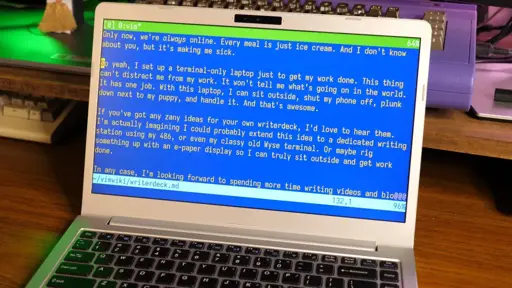
The italic text in Vim threw me for a loop. But I realised it makes sense.
Syntax highlighting already exists in editors. Terminal based ones often implement this in terms of terminal escapes or similar. Most modern terminal emulators support the enable-italic escape. Thus, some combination of these can effectively emulate markdown.
What I do note is that my root Linux consoles (Ctrl+Alt+F[1-6]), and LMDE) don’t support italics, suggesting the Vim instance is running in a full-screen terminal emulator under some windowing system or another.
That seems like overkill just for italics in an otherwise text-only interface, but maybe I’m missing something (patience being one possibility).
The answer is right there in the fist paragraph, and in more detail if you read the whole article.
The author uses kmscon, that is a usermode console with proper graphics drivers, hi res rendering, and UTF8 font support. There is no desktop environment used.
I suspect that is where the italics support is coming from. Makes me want to try it out.
https://en.wikipedia.org/wiki/Kmscon
Courtesy of this post, here’s a test script to show a terminal’s capabilities:
I thought that it might be them using fbterm (a more-sophisticated userspace framebuffer virtual terminal emulator that’s an alternative to fbcon, the built-in Linux kernel virtual terminal emulator), but at least on my system, fbterm doesn’t seem to show italics.
EDIT: Ah, saw @zloubida@sh.itjust.works’s comment about kmscon. It looks like they’re using kmscon, a different userspace framebuffer virtual terminal emulator, and explicitly say so in the article.
EDIT2: If you install it, looks like on Debian it gets used by default on next boot as the new console virtual terminal emulator. Note that unlike fbcon and fbterm, you apparently need to use Control-Alt-FKey rather than just Alt-Fkey to switch terminals when you’re inside kmscon, same as if you’re in Xorg or Wayland.
Better use tput instead. The escape sequences depend heavily on the emulated terminal used.
I’m surprised vim supports italics. Is there any terminal standard for that, like colors and bold text?
Apparently there are escape sequences for it; see my response to the parent post.
Even if there weren’t, if a given terminal supported either the older Sixel or the newer KiTTY graphics protocol, it can outright display arbitrary images.
Mainline tmux doesn’t support either protocol, though there’s a fork that does do Sixel. They’re using tmux, so I assume that that’s not the route used.
I wouldn’t be surprised if support comes from a plugin rather than Vim itself. Plugins can do a LOT in Vim.
Of course, Vim also has a crazy base feature set, so I guess I wouldn’t be all that surprised if it did have base support.